Native Mac app · Version 1.0 · By This Dream Place

Reclaim Terabytes, Rediscover Your Media Archive, and Audit Suspect Files — 100% Offline on Your Mac.

TIME Sift is a desktop app for macOS that reads your drives, finds files that are exact byte-for-byte copies, and lets you move the ones you choose to the macOS Trash, with a one-click Put Back. Along the way it keeps music, video and design projects whole, lays out your photos and videos by year and place, and flags files that only pretend to be documents or media. Nothing is uploaded: every scan runs on your own Mac.

Download Free Trial for Mac

Free scan & explore · macOS 13+ · Apple Silicon M1–M4

Buy Full License — $24

$29 Launch Edition · One-time offline key · No subscription

See it before you scan.

Real TIME Sift windows, captured from the app's built-in synthetic showcase archive.

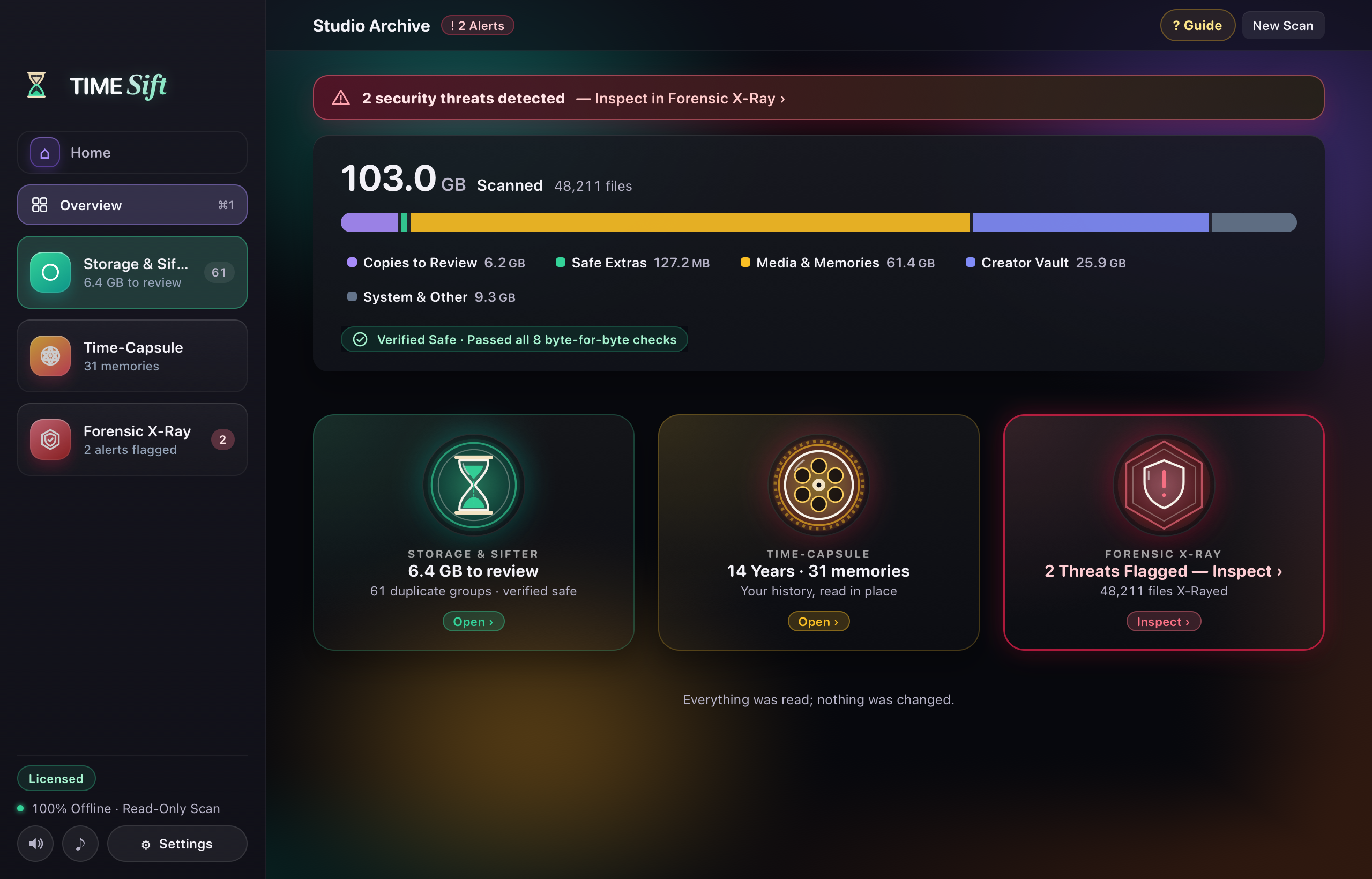
TIME Sift Overview: a multi-color storage bar splitting 103 GB into copies to review, safe extras, media, Creator Vault and system files, with Storage & Sifter, Time-Capsule and Forensic X-Ray cards.
One multi-color bar shows where the space went. 61 duplicate groups, each byte-verified before you see it.

Four tools in one calm window.

Everything below ships in version 1.0 today. Point TIME Sift at a folder, an external drive or a backup, and it does the rest.

Storage & Sifter · Put Back

Byte-verified duplicates, never guesses.

Files are matched by size, then by a full SHA-256 of every byte, never by name or date. You review each copy beside the one that stays, and the ones you choose go to the macOS Trash, not into oblivion.

  • Full-file SHA-256 verification before anything is called a copy
  • The original in an organized folder is always the one kept
  • Every move leaves a cryptographic receipt for a one-click Put Back
Creator Vault

Your projects stay whole.

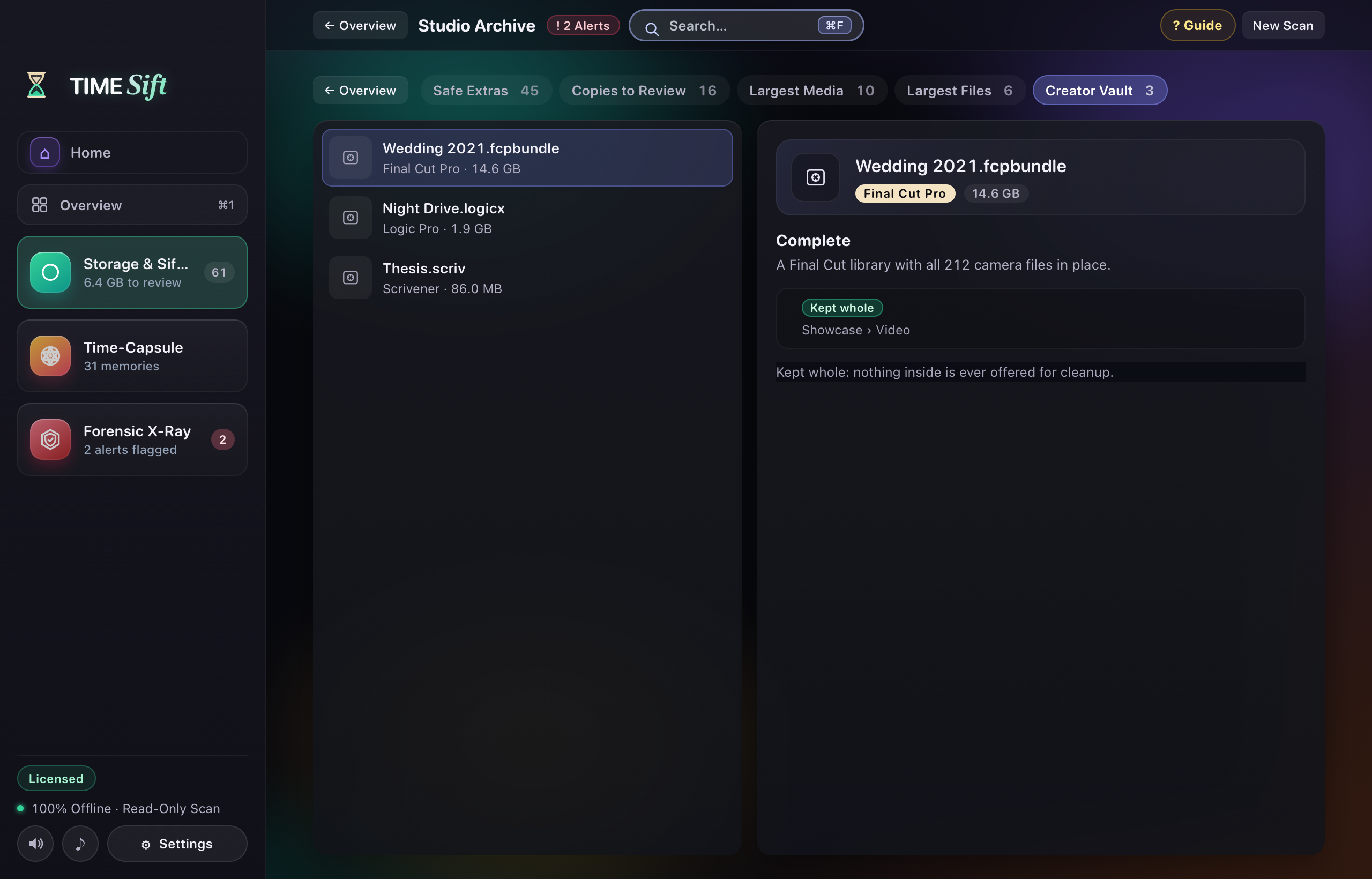
Logic Pro (.logicx), Ableton Live, Pro Tools, Final Cut Pro, Photos libraries and other app and project bundles are shielded as single units, so the stems and assets inside them are never offered as loose duplicates.

  • Bundles are counted and protected, never split
  • Shows which sessions are complete and which are missing audio
  • Identical copies of a single project file are review-only
Time-Capsule · Atlas · Live Soundscape

Rediscover twenty years of media.

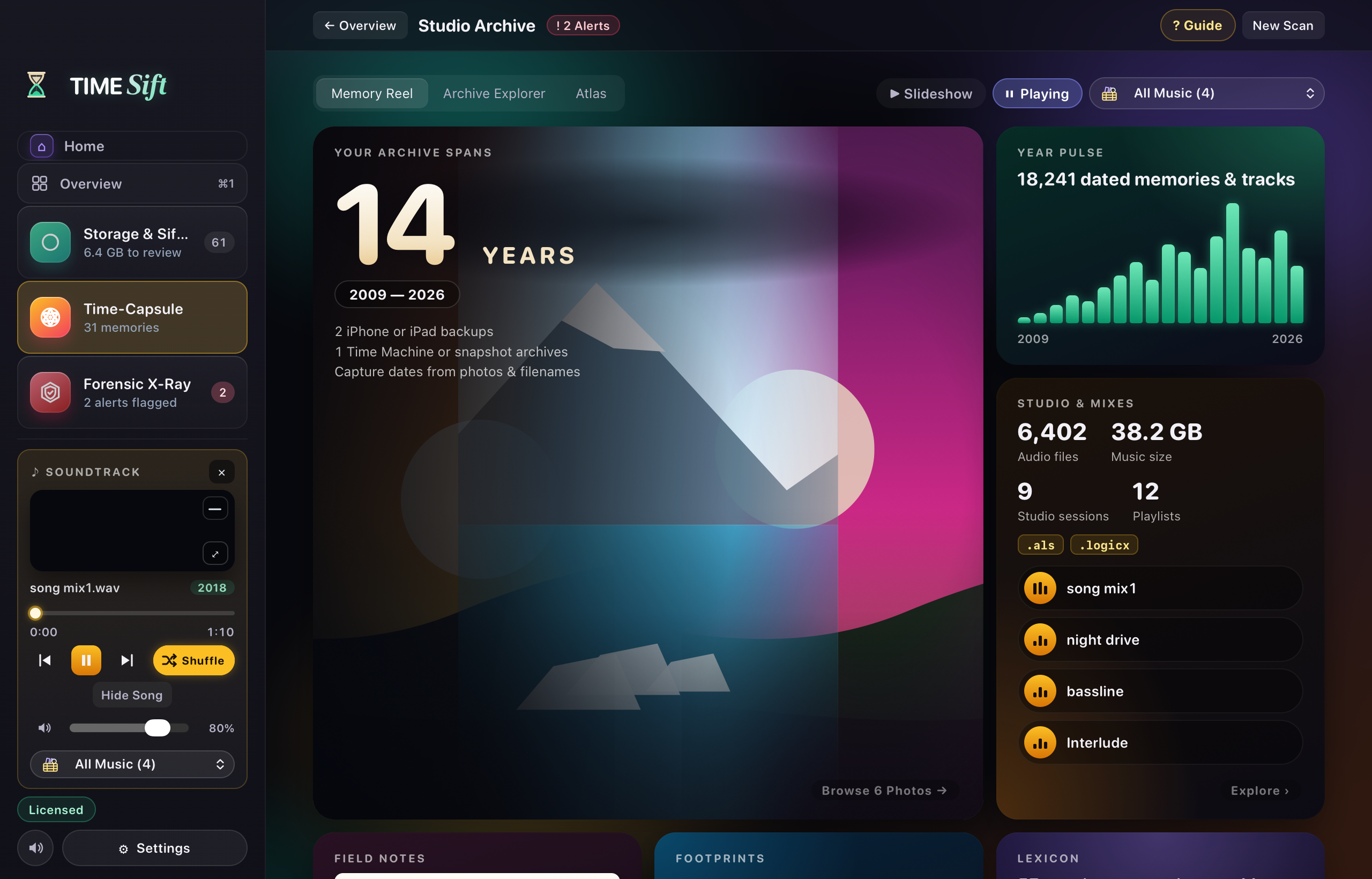
Browse photos and videos on a timeline by year, see where they were taken on an offline map, and play your music library through the built-in Soundtrack visualizer, with lossless and MP3 files alike.

  • Saved scans reopen from cache in under a second
  • Atlas maps your photos' GPS data with no map service
  • Live Soundscape visualizer for the music you already own
Forensic X-Ray

Static inspection of suspect files.

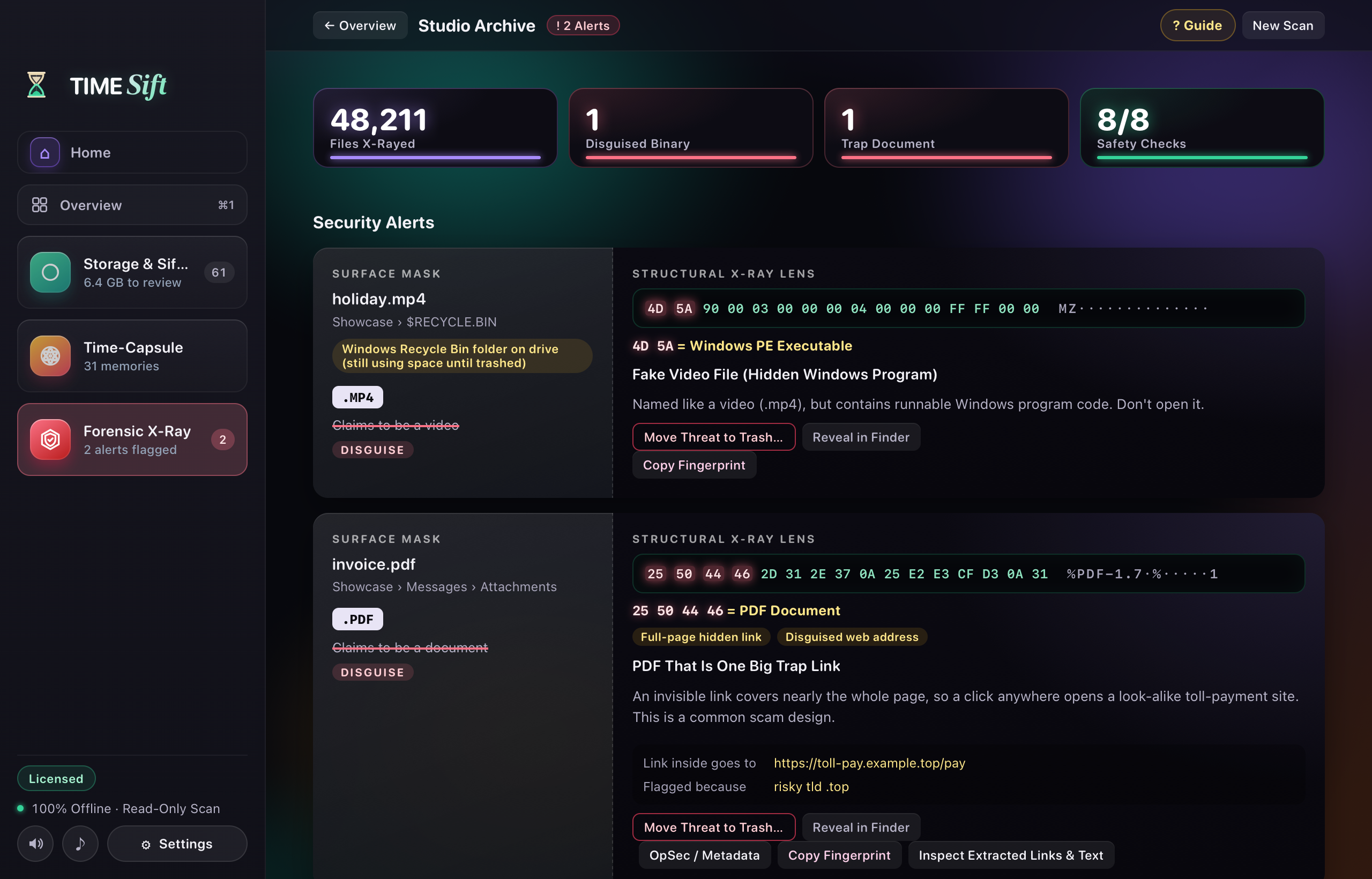
X-Ray reads each file's real header instead of trusting its extension, and checks PDFs in Downloads and Mail and Messages attachments for instructions that launch a program or hide a redirect link. Files are only read, never opened or run.

  • Catches programs disguised as photos, songs or documents
  • Reads embedded metadata such as camera model and location
  • Flagged files are kept out of every cleanup list

Built to never lose a file.

Cleanup tools usually ask for trust. TIME Sift is designed so you never have to give it blindly.

01Read-only scansScanning only reads. Nothing on your drives is changed, moved or renamed while TIME Sift looks.
02Trash, never deleteOnly copies you select move, and only to the macOS Trash, after a fresh byte check and with the kept original still in place.
03Receipts & Put BackEach move is recorded with its SHA-256 fingerprint, so Put Back restores exactly the same bytes to exactly the same place.
04Offline, zero telemetryNo account, no analytics, no uploads. Your license key is checked on your Mac: your files never leave it.

Try it free. Buy it once.

The free trial scans everything and shows every total with a sample of the results. A one-time license key reveals it all and unlocks cleanup on your Mac, with no rescan.

$24USD$29Launch Edition · One-Time Personal License
  • Reveals every duplicate and Forensic X-Ray file path, the full Time-Capsule and Soundtrack, and unlocks Reveal in Finder, Move to Trash and Export… in TIME Sift 1.0
  • An offline license key: paste it once, no account, no sign-in
  • Personal use on your own Apple Silicon Macs (M1 / M2 / M3 / M4+, macOS 13+)
  • Free updates for every version 1.x
  • Secure checkout via Paddle
Buy Full License — $24 Download Free Trial for Mac

Orders are processed by Paddle.com, our Merchant of Record. Prices exclude any sales tax or VAT added at checkout.

Free Trial vs. Full License

Free Trial
Unlimited scans of any folder or drive; full storage totals and Overview; all of Creator Vault; every Forensic X-Ray alert with its count, severity and hex proof (file names hidden); a sample preview of duplicates (3 groups) and Time-Capsule media (24 items, 3 tracks); Put Back
Full License
Every duplicate group and Forensic X-Ray file path, Reveal in Finder, Move to Trash for copies and threats, the full Time-Capsule and Soundtrack, and Export… of the HTML report, unlocked on your open scan at once
Mac
Apple Silicon: M1, M2, M3, M4 or later. Intel Macs and Windows are not supported.
macOS
macOS 13 Ventura or later
Network
None needed: the app and its license work fully offline

Questions & Answers

Straight answers to what people ask before they buy.

What can I do in the Free Trial before buying?

Scan as many folders and drives as you like and see the whole picture: full storage totals, every Creator Vault project, and every Forensic X-Ray alert with its count, severity and hex proof. You also get a sample preview: up to 3 duplicate groups, and 24 Time-Capsule items with 3 Soundtrack tracks. Put Back always works, licensed or not.

The $24 Full License reveals every duplicate group and Forensic X-Ray file path, and unlocks Reveal in Finder, Move to Trash, the full Time-Capsule and Soundtrack, and the standalone HTML report. Activate your key and the scan you have open unlocks at once, with no rescan.

Does TIME Sift ever upload my files, require an account, or connect to the internet?

Never. Every scan, SHA-256 hash, audio waveform and X-Ray check runs on your Mac, with no analytics and no telemetry; the app contains no networking code at all. There is no account to create. Even your TS1-… license key is checked offline: paste it once and you're done.

Will it accidentally break my Logic Pro, Ableton, Final Cut, or app bundles?

No. Creator Vault recognizes Logic Pro, Ableton Live and Pro Tools sessions, Final Cut Pro and Photos libraries, and app and package bundles, and treats each one as a single unit. The stems, renders and assets inside are never offered as loose duplicates, so a project can't be broken apart by a cleanup.

Does it work on external SSDs/HDDs and cloud folders like iCloud Drive, Dropbox, or Google Drive?

Yes. Drop any mounted drive onto TIME Sift: an internal disk, a USB or Thunderbolt SSD or hard drive, or an SD card, formatted APFS, HFS+, exFAT or FAT32. Cloud-sync folders work too. Files already downloaded to your Mac are scanned like any other; files that live only in the cloud are listed but never downloaded or opened.

Is the $24 license really a one-time purchase, and can I use it on both my desktop and laptop Mac?

Yes. You pay once and there is no subscription. One personal license covers every Apple Silicon Mac you personally own (M1 / M2 / M3 / M4+, macOS 13 or later), so your desktop and your laptop are both included, along with every 1.x update.

Why is TIME Sift downloaded directly here instead of the Mac App Store, and what if I trash something by mistake?

Mac App Store apps must run inside Apple's sandbox, which blocks the full cross-drive and project-bundle scanning TIME Sift is built for. The direct download here is signed and notarized by Apple.

And mistakes are recoverable: TIME Sift never deletes anything permanently. Selected copies move to the macOS Trash with a SHA-256 receipt, so one click on Put Back restores the exact same file to the exact same place.

Support from the studio.

Questions before you buy, or help after: write and you'll hear back from the people who build TIME Sift.

Studio

This Dream Place · New York, USA

Replies within 1–2 business days.

Orders & billing

Orders, tax invoices and billing are handled by Paddle.com, our Merchant of Record. Your receipt email from Paddle links to your order.

Bought TIME Sift and lost your license key?